Beyond IAM: Temporary Cloud Access That Works Across AWS and Azure


AWS FOR THE REAL WORLD
⏱️
Reading time: 9 minutes
🎯
Main Learning: Build a self-service portal that grants temporary AWS + Azure access and revokes it automatically β€” using Kestra and one YAML file.
πŸ“
🎬

Hey Reader πŸ‘‹πŸ½

Happy new week!

Tobi and I met up last week and spent some time planning the videos ahead. We’re going more and more into YouTube β€” and a few things I’m hyped about:

  • The biggest AWS mistakes we’ve made (so you don’t have to)
  • How DevOps, Observability, and IAM have actually evolved over the years
  • More AI + AWS fullstack development content

We love AI. But we still want to teach the real-world basics that nobody else covers.

Which is exactly why I’m excited about today’s sponsor: Kestra.

I’ve talked a lot about TEAM β€” the AWS solution for automating temporary admin access. TEAM is great. But it has one hard limit: your devs almost always need access to more than just AWS. The moment Azure or another cloud enters the picture, TEAM stops at the door.

This is where Kestra comes in.

Rather watch a video? We’ve recorded one for you πŸ‘‡πŸ½

Sponsored by Kestra

One workflow engine for AWS, Azure, and everything in between

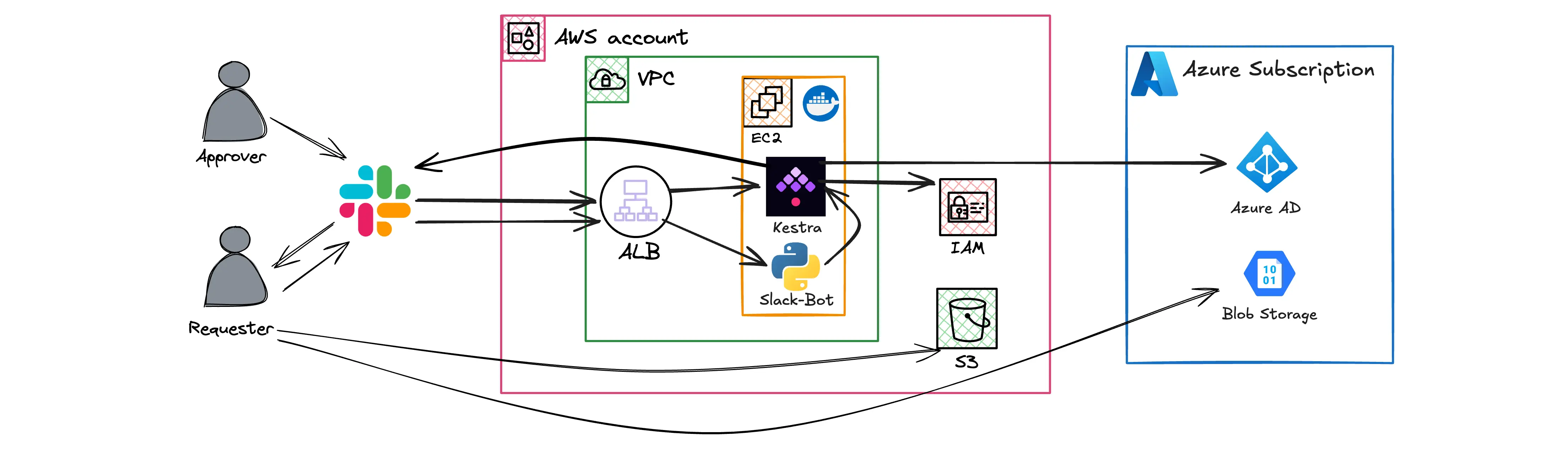
Architecture: Slack triggers Kestra on EC2, which provisions access on AWS IAM and Azure

Kestra is a YAML-first orchestrator built for infrastructure and DevOps automation. Write a workflow once, pause it for human approval in Slack, and let Kestra handle running, retrying, logging, and cleanup. 1200+ plugins, any language for script tasks, self-hosted or cloud.

In today's deep dive we use it to build a cross-cloud just-in-time access portal that even AWS TEAM can't cover.

This issue is sponsored by Kestra. We only partner with tools we'd actually use ourselves.

Cross-cloud just-in-time access with Kestra

πŸ“š This Week's Deep Dive

A contractor joins your team for a 3-week sprint. You create an IAM user, attach a policy that looks reasonable, and assign them a Reader role on the Azure subscription. The sprint ends. Nobody touches the permissions again.

Three months later that IAM user still has the policy. The Azure role is still there. No expiry, no audit trail, no process. Multiply that by ten contractors a year and you stop knowing who has access to what β€” and why.

Provisioning takes two minutes. Cleaning up requires someone to remember, and that almost never happens reliably at scale.

AWS TEAM solves half the problem

AWS has an open-source solution for this called TEAM. A dev requests elevated access, a manager approves, credentials expire automatically. It works great β€” for AWS.

The hard limit: TEAM runs on top of IAM Identity Center. The moment a contractor needs access to Azure too, you're back to manual cleanup or another dedicated tool. What you actually want is one place that handles the full lifecycle across both clouds.

What we're building

A self-service access portal using Kestra β€” a YAML-first workflow orchestrator built for infrastructure automation. One YAML file. Slack approval. Auto-revocation.

The flow:

  1. A contractor (or whoever's authorized) runs /request-access john.doe 60 fix prod bug in Slack
  2. The approver gets a private DM with Approve/Deny buttons β€” no Kestra login needed
  3. On approve, Kestra attaches an S3 read policy on AWS and assigns a Storage Blob Data Reader role on Azure
  4. After the requested duration, Kestra removes both β€” automatically

The whole thing runs on a single EC2 instance with Docker Compose. Kestra plus PostgreSQL, two containers, behind an ALB. t3.medium is enough to start.

The Pause primitive is the magic

The interesting part isn't the access management. It's that Kestra has a Pause task that waits for a human, with a configurable timeout, that you can resume via API from anywhere β€” Slack, Teams, a web form, whatever.

Same primitive works for production deployment approvals, database password rotations, cost threshold alerts with a "pause the pipeline" button. You write the logic in YAML and Kestra handles the waiting, retrying, logging, and cleanup.

Audit logs you didn't have to set up

Every execution stores who requested access, who approved it, what each task returned, and when each step happened. CloudTrail tells you the API call happened. Kestra tells you why.

The blog post walks through the full setup: Terraform for AWS + Azure + Kestra, the Slack bot, the YAML flow, the revocation logic, and the things to watch out for in production (RDS instead of the sidecar Postgres, S3 storage backend, capping the max duration).

Amazing that you're reading until here!
​

Check out Kestra here :)
​

Have a great week ahead!
​Sandro & Tobi

AWS for the Real World

We teach AWS for the real world - not for certifications. Join more than 10,500 developers learning how to build real-world applications on AWS.

Read more from AWS for the Real World

AWS FOR THE REAL WORLD ⏱️ Reading time: 4 minutes 🎯 Main Learning: Which AWS services are worth your time and which ones to skip 🎬 Watch on YouTube Hey Reader πŸ‘‹πŸ½ a new week, new AWS video coming out. I (Sandro) used all of my knowledge from the past six plus years building AWS solutions, ranking the services I actually use and the services I hate. For some I've changed my mind A LOT over the years (e.g. DynamoDB). Let me know what you think and check it out.Here you go AWS News But first of...

AWS FOR THE REAL WORLD ⏱️ Reading time: 12 minutes 🎯 Main Learning: The 11 most impactful AWS releases from the past 12 months that have nothing to do with AI. πŸ“ Blog Post Hey Reader πŸ‘‹ Every re:Invent recap, every AWS blog, every newsletter from the past year has been dominated by one topic. You know which one. But while everyone was writing about agents and foundation models, the core infrastructure layer kept moving. Quiet releases. No keynote fanfare. Things that actually affect your...

AWS FOR THE REAL WORLD ⏱️ Reading time: 5 minutes 🎯 Main Learning: Deploy AWS's open-source TEAM solution for temporary admin access with approval workflows 🎬 Watch on YouTube Hey Reader πŸ‘‹πŸ½ I hope you had a great weekend and have a great week ahead. One thing I see over and over again in AWS setups: admin permissions are either handed out way too easily or way too hard. There is no middle ground. In other systems this was already solved. You shouldn’t have to DM somebody for admin access. We...