Hey Reader 👋🏽
When building applications on AWS, we need to run our code somewhere: a computation service. There are a lot of well-known and mature computation services on AWS.
You’ll often find Lambda as the primary choice, as it’s where you don’t need to manage any infrastructure. You only need to bring your code - it’s Serverless ⚡️.
However, more options can be considered serverless, and they are even more mature than Lambda.
In this issue, we'll introduce you to the 🏗️ Elastic Container Service - better known as ECS - and one of its computing options, Fargate.
As mostly, we've prepared a hands-on repository that you can easily deploy into your own AWS account.
What is ECS?
ECS is a highly scalable and fast container management service. It offers a management plane to orchestrate containers in your cluster. Simply run, stop, and manage containers. 🏗️
It comes with many features to ease your development process and reduce operations and liabilities.
- With the Fargate launch type, you don’t need to worry about the underlying infrastructure. You’ll only need to determine which container image you want to run and what workload capabilities you require in terms of memory or virtual CPUs.
- It’s fully integrated with AWS IAM. You can define fine-grained permissions based on your requirements and never have to think about users or passwords. Define any level of isolation that you want or require from a compliance perspective.
- It’s integrated with CloudWatch Metrics and Logs. All of your logs are automatically shipped to CloudWatch and ECS will also forward important runtime metrics like CPU and memory usage. All of this comes without additional configuration efforts.
ECS is one of AWS’s most battle-tested services and is often a perfect fit for critical core infrastructure that needs to handle high-volume request microservice APIs.
Key Concepts
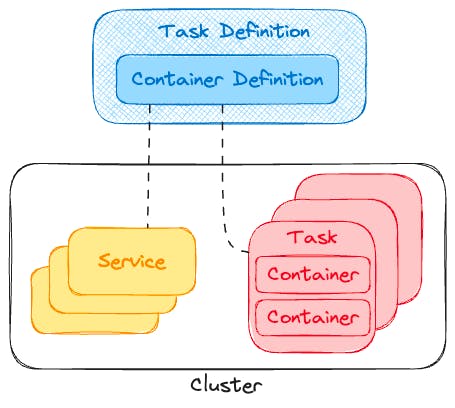
While exploring and learning about ECS, you’ll come across many key terms that might not be easy to understand initially. However, they are essential for understanding how ECS works. Let’s dive into containers, tasks and task definitions, services, and clusters.
Containers
Docker is a fundamental component of container services, allowing the creation of lightweight environments known as containers that can run applications across different operating systems.
These containers encapsulate all necessary components, such as specific libraries or language versions, enabling execution on any machine.
Multiple containers can operate on a single machine, using intra-container communication, while maintaining host security through strict separation.
As applications and container numbers grow, managing and orchestrating these containers becomes challenging, involving tasks like deployment, scaling, and lifecycle management.
ECS addresses these challenges by providing a management plane and automations, allowing developers to concentrate more on application development instead of these operations.
Task Definition
A task definition serves as a blueprint for launching containers, encompassing several key properties.
- The launch type determines the service used to execute tasks, such as EC2, Fargate, or External.
- Two essential roles are required: the task execution role, which grants permissions for starting containers and accessing secrets, and the task role, which provides permissions for applications within containers to interact with AWS services.
- The container image specifies the Docker image from a registry like Amazon ECR. vCPU and memory allocation define the compute resources, with options varying by launch type.
- Environment variables allow the injection of stage-dependent parameters.
- Secrets enable secure injection of sensitive data from AWS Secrets Manager, requiring appropriate permissions.
- The logging configuration specifies the log driver and destination, with options varying by launch type.
- Finally, exposed ports define how inbound traffic is mapped between ECS and the container image.
Task
A task represents the execution of a task definition, consisting of a group of containers running on the same host. Defined using the Docker-Compose file format, tasks allow the specification of container images, environment variables, port mappings, and additional options for each container.
Tasks can be launched directly and will continue running until manually stopped, or they exit naturally, without automatic replacement.
Service
A service is a persistent process responsible for managing tasks, ensuring a specified number of tasks are consistently operational.
If a task fails due to unexpected container exits, causing the number of healthy tasks to drop below the set threshold, ECS automatically initiates a new task to maintain the desired task count.
Cluster
A cluster is a logical grouping that organizes tasks or services, which operate on infrastructure registered to it. This infrastructure can be provided by AWS Fargate, managed EC2 instances, on-premise servers, or remotely managed virtual machines.
Launch Type
The launch type determines how a container runs. In ECS, you have several options: EC2, Fargate, or External. Since Fargate requires the least operational effort, we’ll focus on it.
Creating Our First ECS Service That Runs a Node.js Application on Fargate
After we have acquired all the necessary knowledge, we can proceed to build our first service, which runs a docker-based application with ECS in Fargate.
We need to:
- Initialize a new container registry at ECR, which will later be the source from where ECS pulls our application.
- Set up our sample application, package it into a Docker image, and push it to our new repository.
- Set up a new task definition that references our image in ECR. It is the blueprint for running our application in a Fargate task.
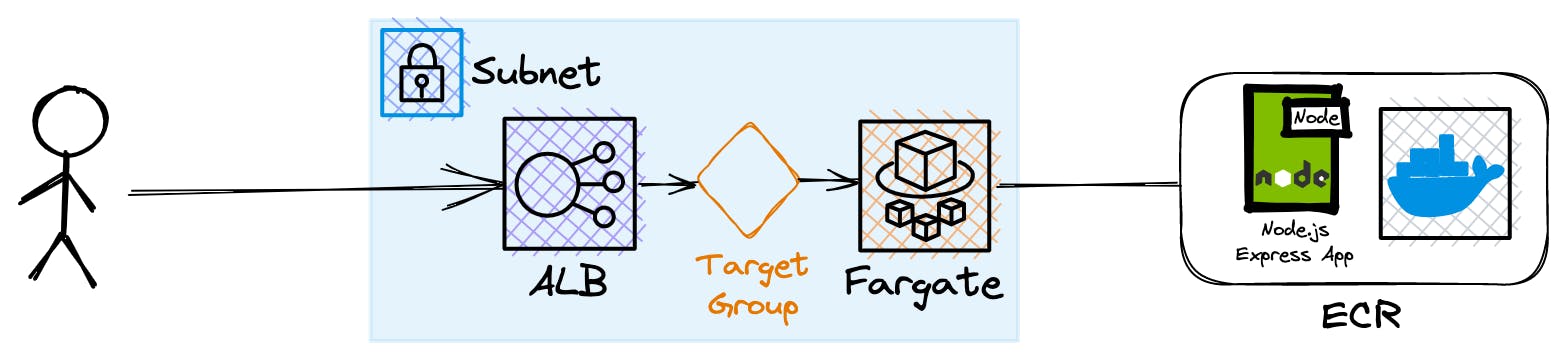
- Creating the necessary networking infrastructure. We’ll need to set up a VPC, multiple subnets, a security group, a load balancer, a target group and an internet gateway.
- Finally, launch our Serverless service. The service will orchestrate our containers and guarantee that a certain number of tasks are always healthy.
- Send requests to our application!
A basic architecture diagram, without detailing the task, task definition, service, and cluster of ECS, looks like this:
You can read the full article in our blog, where we describe every step in detail. Or you directly check out the hands-on repository to explore it yourself.
Wrap Up
Amazon ECS with Fargate and AWS Lambda are both serverless options on AWS, but they come for different needs.
Lambda is ideal for event-driven, short-lived tasks, offering cost-effective scalability without server management. It's the perfect fit for bootstrapping a project, as you don't need to worry about much or any initial costs.
ECS with Fargate, on the other hand, provides more control and flexibility, suitable for long-running processes and complex applications with multiple services and (heavy) steady traffic. It supports Docker, integrates well with AWS services, and allows granular resource management, making it a perfect choice for companies that need a battle-tested, mature AWS service for their core resources that come with high workloads.
You'll almost never find a company that runs its infrastructure on AWS without using ECS with Fargate in some part.
We definitely love ECS - even with the networking burdens - and we hope you will too. 💕
P.S.: don't forget to check out and follow our GitHub organization 👾. We're collecting all of our hands-on learning projects here.